Welcome to the OnixS ultra-low latency C++ FIX Engine.
The documentation for the FIX Engine includes extensive class library reference, conceptual overviews, step-by-step procedures, and information about samples.
OnixS ultra-low latency C++ FIX Engine is a C++ class library that will FIX-enable applications written in C++ language.
OnixS C++ FIX Engine provides the following services:
- Manages a network connection.
- Manages the FIX session layer (for the delivery of application messages), handles Sequence Reset, Resend Request, Test Request, Logon and Logout session-level messages automatically.
- Manages the FIX application layer (defines business-related data content).
- Creates (outgoing) FIX messages.
- Parses (incoming) FIX messages.
- Validates FIX messages.
- Persists messages and FIX session state.
- Recovers the FIX session state after restarting in accordance with the FIX state model.
- Detects the telecommunication link failures and reconnects the FIX session automatically.
- TLS/SSL-based encryption.
- FAST compression and decompression.
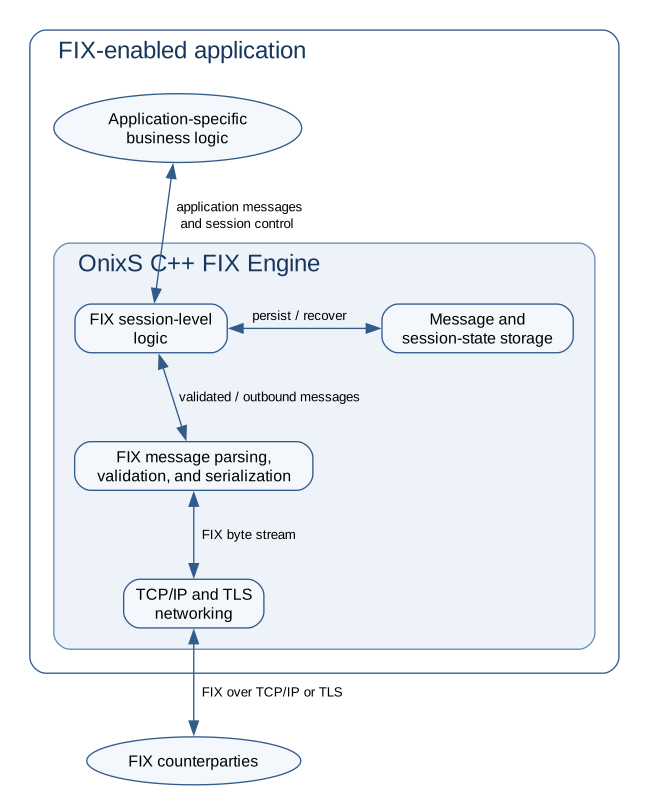
The following image is a high-level overview of the C++ FIX Engine architecture:
Choose Your Path
- Start evaluating: Review System Requirements, set up Licensing, and complete Your First FIX Session.
- Understand the core API: Learn about Engine initialization, Configuring the Engine, FIX messages, and FIX Session fundamentals.
- Explore examples: Start with Getting Started Samples, then explore Advanced Samples and Benchmark Samples.
- Implement advanced session behavior: Begin with Advanced FIX session topics, then explore ExternalThread Mode, Message Throttling, and Controlling Outgoing Message Flow.
- Prepare for production: Review session storage, restoring session state, failover, logging services, and best practices.